Controls
Keyboard & mouse
- W / S
- Raise / lower throttle
- E
- Engine on / off
- Arrow keys
- Pitch and yaw
- Hold B
- Easy manual: brake sideways drift below 1.5 km. Uses fuel; it does not move you to the pad or control vertical speed.
- Q / R
- Roll in Insane mode
- L
- Toggle upright assist (Assisted mode)
- Space
- Pause / resume
- Mouse drag / wheel
- Drag to orbit. Use the wheel to zoom.
Drag the 3D view to adjust it manually; click Chase again to reset the view. Use + / −, the mouse wheel, or a two-finger pinch to zoom.
Gamepad
Gamepads are not supported in this build. Use the keyboard and mouse or the on-screen touch controls.
Touch (phone & tablet)
- Take control
- Fly manually, then press Resume guidance to land from your current flight.
- Arrow buttons
- Tap briefly to lean or recover upright. Use short taps and release.
- Centre RCS button
- Hold below 1.5 km to brake sideways drift with balanced side thrusters.
- Drag / pinch
- Drag to orbit. Use a two-finger pinch or + / − to zoom.
How to play
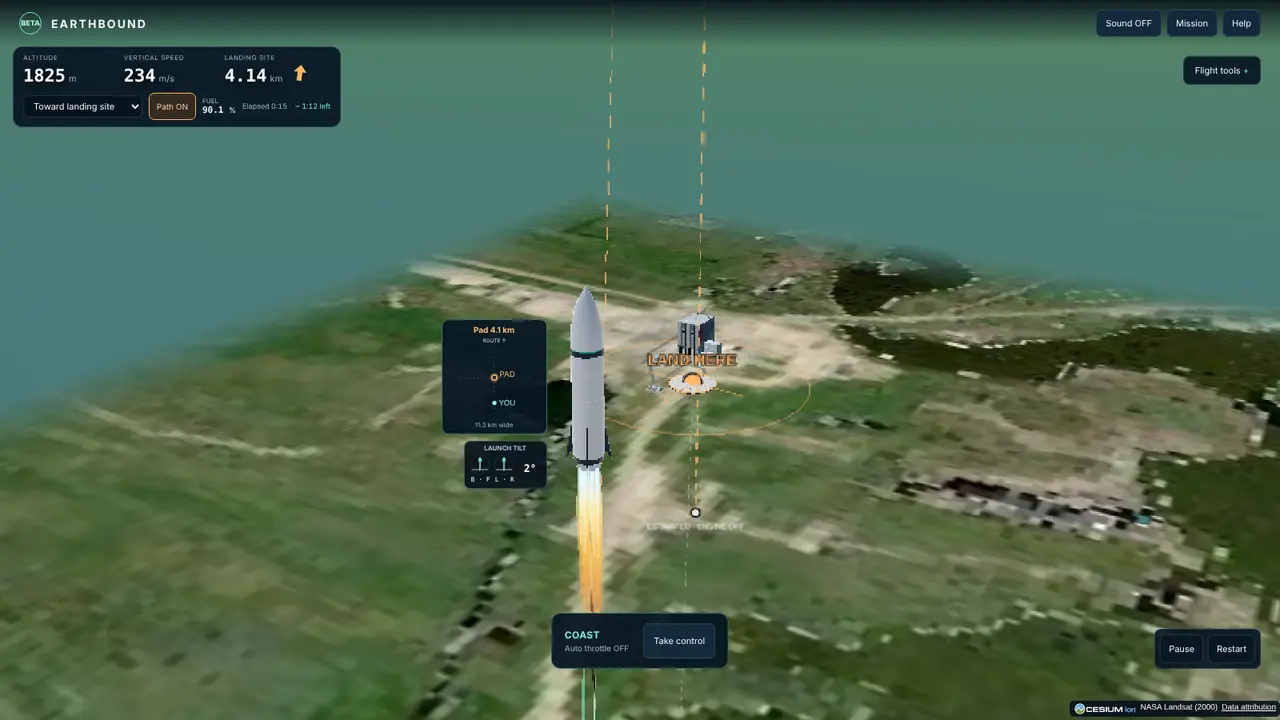
Choose a launch landmark to fly a scenic route. Paris approaches the Arc de Triomphe, Kennedy lands beside the Vehicle Assembly Building, and the mountain presets pass illustrated landmarks between textured ridges. Each of the six presets includes bundled historical ground imagery.
Easy is selected by default. Choose your sites and press Launch guided flight. The guide handles steering and power. Press Take control to fly manually, then Resume guidance to land from your current flight. Resuming after liftoff never restarts the original climb; existing upward momentum coasts with the engine off first. If the target is beyond safe reach, LAND NEARBY means a nearby touchdown is being attempted, with the original target distance still used for scoring. Assisted and Insane use manual engine and throttle controls.
Assisted mode damps rotation after you release a control. Insane mode retains angular motion. Optional Level assist points the rocket upright and consumes reaction-control fuel. Assisted and Insane do not land for you. Easy adds explicit route and power guidance.
Scores combine accuracy (50%), touchdown quality (35%) and fuel remaining (15%). Speed and tilt reduce touchdown quality gradually. Accuracy and fuel points count for every survived landing.
Tips
- Start with Easy mode and Practice a landing. The guide manages your descent. For manual practice choose Assisted. You begin 1,200 m above the target, descending at 40 m/s. Ignite promptly; pause to read the current coaching, or open Help.
- Use Level assist to recover upright, then adjust throttle as descent slows. Reduce thrust before you start climbing again. Aim for a gentle touchdown.
- Try a launch with the default nearby target before a long trip. Brief arrow-key inputs tilt the rocket; release them to stop rotating in Assisted mode. The target bearing is a compass direction, not a steering command.
- Watch the small landing navigator. The orange ring marks the selected pad and the mint dot marks your rocket. Up follows the launch route.
- During the coast, set throttle to 100% with the engine OFF so it is ready. Ignite when prompted.
- Near a late burn, hold the rocket upright and use full thrust.
About Earthbound
A free browser rocket simulator. Pick two points on Earth. Fly the space between.
Earthbound simulates a fictional rocket flight. Flight state, chosen coordinates and controls run in your browser.
Earthbound’s six preset areas include bundled Landsat WELD imagery from NASA GIBS / ESDIS (2000). Close views add illustrated streets, paved areas and adaptations of CC0 surface photographs from ambientCG. The photographic material supplies texture at game scale. Individual stones, streets, buildings and pad surfaces are approximate.
The rocket and performance are fictional. Ground contact currently uses simplified surfaces. Ballistic guidance is approximate and assumes no engine thrust. This is an early build, not an aerospace training tool.
Released October 12, 2026 · updated November 20, 2026. See the privacy notes and terms and credits for this game.
FAQ
Is Earthbound free?
Yes. Earthbound is a free browser rocket launch and landing simulator in public beta. Choose locations on Earth, fly with guided or manual controls, and aim for a soft landing.
What is the difference between Easy, Assisted and Insane?
In Easy, the guide handles steering and power, and you can take control at any time. Assisted mode damps rotation after you release a control. Insane mode retains angular motion. Assisted and Insane do not land for you.
How far can I fly in Easy mode?
Easy supports nearby routes up to 20 km and landing practice, with platform elevations at or above 0 m on the simplified contact surface.
How soft does my landing have to be?
In Easy, a rough landing up to 20 m/s vertical speed, 12 m/s ground speed and 40° tilt can survive with lower touchdown quality. Larger impacts still crash. Assisted and Insane retain the 5 m/s, 3 m/s and 12° limits.
Is the map imagery current?
No. Near launch and landing, NASA GIBS Landsat WELD true-colour imagery adds roughly 30 m detail from a historical composite dated 2000-12-01. This is not current imagery.
Is the physics realistic?
The rocket and performance are fictional. This is an experimental game for entertainment. Do not use its physics, trajectory predictions, map imagery or scores for navigation, engineering or real launch decisions.
Where are my scores saved?
Successful-flight best scores and their route coordinates can be saved in your browser’s local storage. Clear site data in your browser to remove them. This version does not offer real-world prizes or a shared leaderboard.