Controls
Keyboard & mouse
- WASD / arrows
- Accelerate, reverse, and steer
- Space
- Brake
- C / Q / drag view
- Switch camera / center view / look around
- R
- Recover rover · −75 Survival points
- Esc or P / M / F
- Pause / mute / fullscreen
These are default keys. Customize them in the pause menu; arrow keys and Escape remain available.
Gamepad
- Left stick / D-pad
- Steer
- RT
- Accelerates
- LT
- Brakes then reverses
- A
- Brakes
- X
- Switches camera
- Right stick
- Looks
- Y
- Centers view
- Hold B for 0.8 s
- Recover
- Menu
- Pauses / resumes
Optional standard gamepad: click Play, then press a controller button.
A resumes or restarts after destruction. Release all controls after starting or resuming. An active controller disconnect pauses the run. Browser/controller support varies; keyboard and touch remain available. A / X / Y / B mean bottom / left / top / right face buttons (PlayStation: × / □ / △ / ○); Menu is also called Options.
Touch (phone & tablet)
Hold left/right with one thumb and GO with the other. REV brakes first, then reverses. BRAKE stops the rover. On compact screens, Tools holds camera, recovery, sound and view actions; Pause stays visible. Drag the open driving view to look around; the pedals remain independent. The pause menu can swap steering and pedals between sides.
How to play
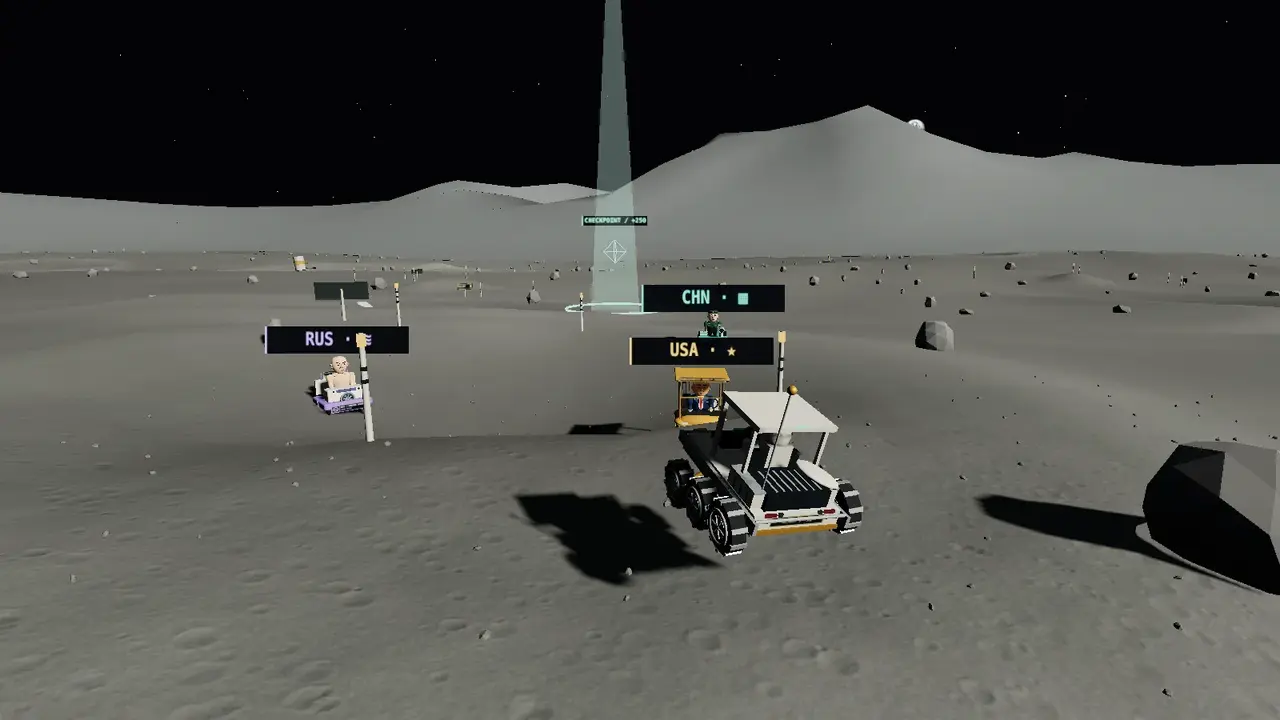
Lunar Lunacy is a free, single-player 3D browser driving game. Pilot a six-wheel rover over craters, ridges, and open regolith. Switch between a chase camera and a visible first-person cockpit.
In Survival, follow the beacon, collect named checkpoints along branching routes, repair your rover, and evade increasingly absurd attacks. There is no finish line: your run ends when the rover loses all integrity. Choose Extreme for a faster escalation. In Explore, roam the same region with no enemies, damage, or time pressure.
Take optional amber survey lines over sculpted crests, winding rilles, and crater shoulders. Pass three pairs of stakes in order, land clean jumps, and narrowly evade impacts for extra Survival points. Faction collisions cost only five integrity; projectile hits cost twelve to eighteen. Explore lets you practice the same lines without damage or a countdown.
Watch for high lob arcs and occasional low horizontal throws. A small faction arrow warns about approaching low throws outside your current camera view; steering, jumping or boulder cover can avoid them. A RAM warning announces a charge. Pursuers can outrun the rover, but only one can commit to a ram at a time. Reinforcements, mixed salvos and closer pursuit increase the pressure, while each projectile type keeps its own horizontal speed. Checkpoints repair up to twelve integrity in Standard and eight in Extreme.
Tips
- Landscape gives you more room. Follow the mint beacon and direction arrow.
- Leave a marked target before an attack lands; faction labels identify the attacker.
- Clean jumps and close dodges earn Survival points. Faction contact costs 5 integrity, less than projectile hits.
- Play for about ten seconds, then pause. Try Low graphics if driving feels uneven.
- Pausing, switching tabs, or losing focus freezes your run. The region has marked boundaries and a recovery control.
- In Explore, steer slightly left toward the orange freight gantry or right past the lander to reach the split rocks. Try the big crater’s southern bank for a sweeping turn.
About Lunar Lunacy
Fictional political parody. Leaders, institutions, and territorial egos are the joke.
Everyone brought a flag. Nobody brought common sense.
The Greatest Moon Base (USA / gold-cart diplomacy). Oversized hair. Impractical suits. Diet-cola cans with a surprisingly ambitious flight plan. Look for: circular can targets.
Definitely Not Our Crater (Russia / unclaimed laundry). Stern, bare-chested officials and laundry drones. Their fictional goo zones are strictly slapstick. Look for: striped goo zones.
Lunar Planning Committee (China / bureaucratic interception). Fictional Commander Lin, jade survey rabbits, and a very large “PERMIT DENIED” stamp. Look for: rectangular grids.
This is original fictional satire about political leaders, bureaucracy, and territorial competition. It does not represent real claims, events, or affiliations. No government, space agency, or depicted public figure endorses this game.
Scores, personal bests, and settings stay in your browser. No account, leaderboard, paid upgrade, or runtime AI service is involved.
Released October 16, 2026 · updated November 21, 2026. See the privacy notes and terms and credits for this game.
FAQ
Is this free, and does it need an account?
Yes, the game is free and needs no account. Your personal bests and settings are saved locally when browser storage is available.
Is there a peaceful mode?
Explore uses the same driving region with no enemies, attacks, damage, or countdown. Checkpoints are optional navigation markers. From the starting view, steer slightly left toward the orange freight gantry or right past the lander to reach the split rocks. Look for the stepped basalt columns at the passage mouth. Try the big crater’s southern bank for a sweeping turn. Near Cola Flats, a bucket-wheel excavator cuts into terraced hills. Beyond Earthwatch, six impact bowls form a chain you can drive across.
Is the terrain a real lunar location?
The driving region is invented procedural terrain. Distant relief is adapted from NASA’s Aristarchus regional printable model, rescaled for this fictional setting. Earth uses a cropped Apollo 10 photograph. NASA’s CGI Moon Kit was researched but its data is not bundled. This is not a survey-accurate reconstruction; scale, Earth placement, routes, and close surface detail are artistic choices.
How realistic is the rover?
Gravity is approximately lunar at 1.62 m/s². Steering, traction, suspension, and recovery are tuned for enjoyable arcade driving. Synthesized sounds represent cockpit feedback, not audio travelling through vacuum.
How does Survival end?
Survival continues through successive checkpoints until integrity reaches zero. Checkpoints give points and repairs. Attack intensity increases within hard object caps. Ground warnings show a shrinking white countdown perimeter before impact and the time remaining in active goo/grid zones. There is no victory screen or final destination.
What can I do besides follow checkpoints?
Six optional survey lines have roadside signs and amber-topped stakes. A small optional-route arrow previews nearby approaches. Enter either end and pass all three gates in order. They have no deadline; after completion each rests for ninety active seconds. Clean airborne landings and close projectile dodges add Survival points; short cockpit cues distinguish those rewards and a completed survey. These activities never repair the rover or replace the main checkpoint route. In Explore, lines and jumps are logged for the current drive without a score or time pressure.
Will this work on my phone?
Touch controls are built in, and graphics default conservatively on phones. WebGL 2 and a recent browser are required. Use Low quality if performance struggles; device-specific testing is still needed.